Control structures
Chalk’s two control structures, decided as the document compiles: @for repeats source — a count, a range or each row of a dataset — and @if keeps or drops it.
Chalk has two control structures: , a loop, and , a conditional. Both are decided as the document compiles, and the internote a reader opens holds only what they produced.
#Repeating with @for
writes its body out again for every pass. Its implicit value says how many passes: a whole count, counted from 1, an inclusive range that counts upward, or a dataset, one pass per row.
@for:3{
    Attempt {{i}} of 3.
}
That is three paragraphs, Attempt 1 of 3. to Attempt 3 of 3. :0 writes nothing; :-2..2 makes five passes, −2 to 2. A range written downward is refused: descending range `3..1` — `from..to` iterates upward, so `from` must not exceed `to`.
The body is any Chalk that is legal where the stands. Inside a graph it repeats marks; at the top of the document it repeats whole scenes. The counter is spliced in as text before the body is read, so it lands wherever text can — in a heading, in maths, in an expression:
@for:2..4{
    scene{
        ## $x^{{i}}$

        Near the origin, $x^{{i}}$ is flatter than $x^{{i - 1}}$.
    }[
        graph{
            curve(expression: x^{{i}}; domain: [-1.5, 1.5])
        }(
            y domain: [-2, 2]
        )
    ]
}
Three scenes, for x^2, x^3 and x^4.
Inside one graph, the same loop draws a family of curves, each pass a curve with its own label:
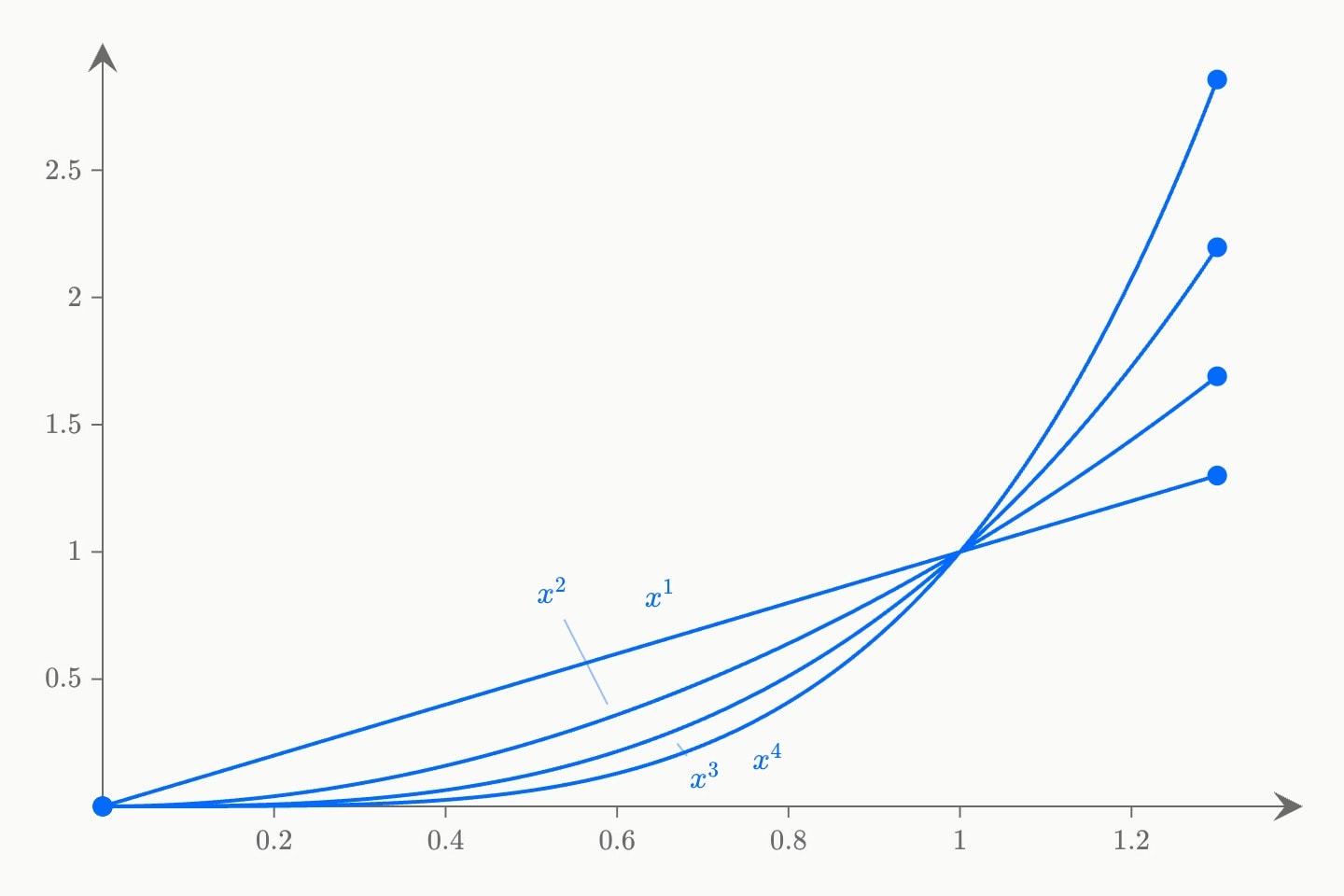
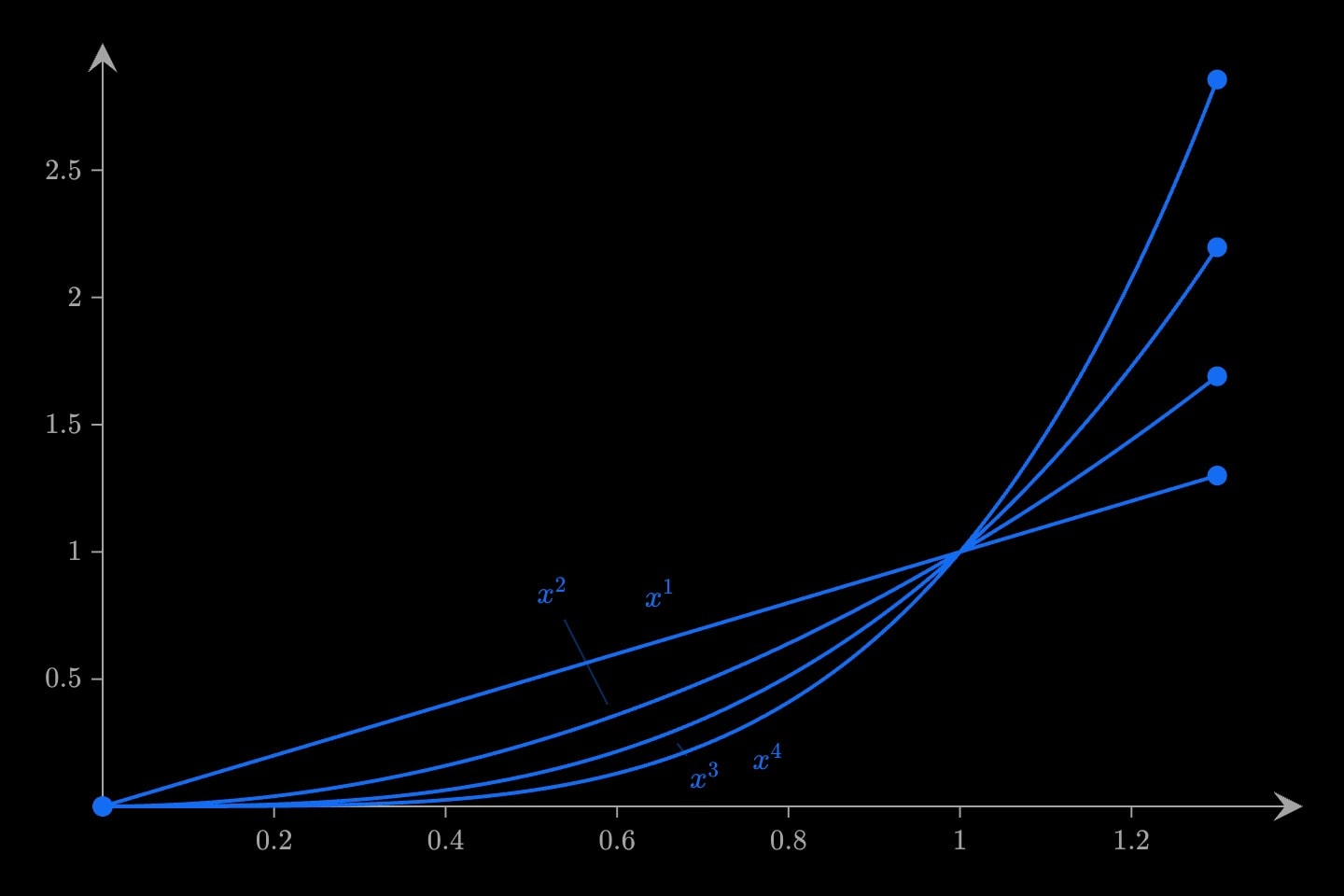
graph{
    @for:1..4{
        curve(expression: x^{{i}}; domain: [0, 1.3]; label: $x^{{i}}$)
    }
}(
    x-domain: [0, 1.4]
    y-domain: [0, 3]
)#The counter and its ids
The counter is {{i}} unless as: names it. Inside the body it is a number, so {{i^2}} and {{i - 1}} are arithmetic.
@for(n: 1..3; as: row){
    @for(n: 1..3; as: col){
        {{row}} × {{col}} = {{row * col}}.
    }
}
The counter exists only inside the body. So does anything the body declares: a inside a pass is gone after it, and a outside with the counter's name is hidden inside the loop and back afterwards.
An id written in the body is written once per pass, and ids are unique across the document, so a fixed id is refused on the second pass:
graph{
    @for:0..2{
        point#p(x: {{i}}; y: 0)
    }
}[reference]duplicate id `#p` — already declared by a node at line 3
Splicing the counter into the id gives one id per pass, and each can be reached like any other:
scene{
    The last point sits at height {{#p-4.y}}.
}[
    graph{
        @for:0..4{
            point#p-{{i}}(x: {{i}}; y: {{i^2}})
        }
    }(
        x domain: [-1, 5]
        y domain: [-1, 17]
    )
]
Inside a template, ids made this way are private to each use; Modularity covers how.
#Once per row of a dataset
Given a dataset's id, makes one pass per row, top to bottom. {{i}} is the row number from 1 and {{i.<column>}} that row's cell:
@data#islands{
    island     | area   | species
    Baltra     | 25.09  | 58
    Bartolomé  | 1.24   | 31
    Santa Cruz | 903.82 | 444
}

@for:#islands{
    {{i}}. {{i.island}} covers {{i.area}} km$^2$.
}
The comes first: `@for` reads its dataset in document order, so the `@data` must come first. A pack's dataset is walked the same way, :#biology.lynx-hare (Modularity). How cells are named, what a hyphenated column can and cannot do in arithmetic, and the refusals for a column or a boundary file in place of a dataset are on Datasets.
#Keeping or dropping with @if
keeps its body when every condition holds, and its detail, if it has one, when any fails. Each condition compares a constant with a value:
@let(audience: teacher)
@let(answers)

@if(audience: teacher){
    note{
        Answers are collected in the closing scene.
    }
}[
    note{
        Answer each question before moving on.
    }
]

@if(audience: teacher; answers){
    The worked answers follow each question.
}
key: valuecompares the constant's text with the value exactly:Teacheris notteacher, and1.0is not1.- A bare key tests for
trueand!keyforfalse. A bare(answers)istrue. - Several conditions must all hold. With no detail, a failed
leaves nothing behind. - The constant is declared above: @if condition references undefined constant `level`. A template's parameters and a
counter or cell count as constants.
What the kept branch declares stays inside it, as in a body.
(answers){is four} is printed as written.#Choosing rows
A over a dataset has no filter or sort. An in its body chooses rows, by a cell or by the row number:
@data#islands{
    island     | area   | species | inhabited
    Baltra     | 25.09  | 58      | true
    Bartolomé  | 1.24   | 31      | false
    Santa Cruz | 903.82 | 444     | true
}

graph{
    @for(n: #islands; as: row){
        @if(row.inhabited){
            point(x: {{row.area}}; y: {{row.species}}; label: {{row.island}})
        }
    }
}
Two points, Baltra and Santa Cruz. (row.island: Santa Cruz) keeps one row by name and (i: 1) the first. A condition compares text and nothing else — there is no > or < — so a row chosen by size, date or any other judgement is chosen by a column that says so, as inhabited does here.
#Decided as the document compiles
and run while the document compiles. The compiled internote holds the passes and the kept branch, and nothing a reader does changes which. So a count and a condition read only what is settled then: written values, constants, a template's attributes, loop counters and cells, and expressions over them.
@let(sides: 6)
@let(diagonals: {{sides * (sides - 3) / 2}})

@for(n: {{diagonals}}){
    Diagonal {{i}} of {{diagonals}}.
}
A computed count is written in the named form, (n: {{…}}); the implicit value is a single token, and :{{diagonals}} is refused with that fix. A value the reader can move — a fit's slope, a parameter — is bound, and refused. Here #trend is a fit:
@let(slope: {{#trend.slope}})

@if(slope: 0.9){
    The trend rises.
}[expression]`@if` is decided while the document compiles and cannot depend on `#trend.slope` (`slope` is bound)
What changes as the internote is read lives on the canvas: steps and cues on Motion, parameters set by controls on Controls. Which values are bound is on Expressions.